snow-create
This promotion step is only available in Kargo on the Akuity Platform, versions v1.9.0 and above.
This page is for snow-create step. You can create a ServiceNow record using this step. Check below for other ServiceNow promotion steps.
ServiceNow integration for kargo is a group of promotion steps:
These steps provide a comprehensive integration with ServiceNow, allowing you to create, update, delete, query for records, and track promotion workflows. This is particularly useful for maintaining traceability between your promotion processes and project management activities.
All the steps above support different record types in ServiceNow including managing Change Requests, Incidents,
Problems etc.,. This integration also provides condition tracking through snow-wait-for-condition, making it a powerful tool
for promotion workflows that require coordination with project management systems.
snow-create step supports two APIs:
1. Change Management API
This API is used primarily for managing Change Requests.
Official documentation is available here.
URL format: /api/sn_chg_rest/{api_version}/change/{change_sys_id}/task/{task_sys_id}
2. Table API
This API is used for managing Incidents, Problems, and other record types.
Official documentation is available here.
URL format: /api/now/{api_version}/table/{tableName}/{sys_id}
Using the API
Most of the time you cannot use the field labels you see in the ServiceNow UI as keys in the REST API. For example, if you want to set the value for the “Short description” field:
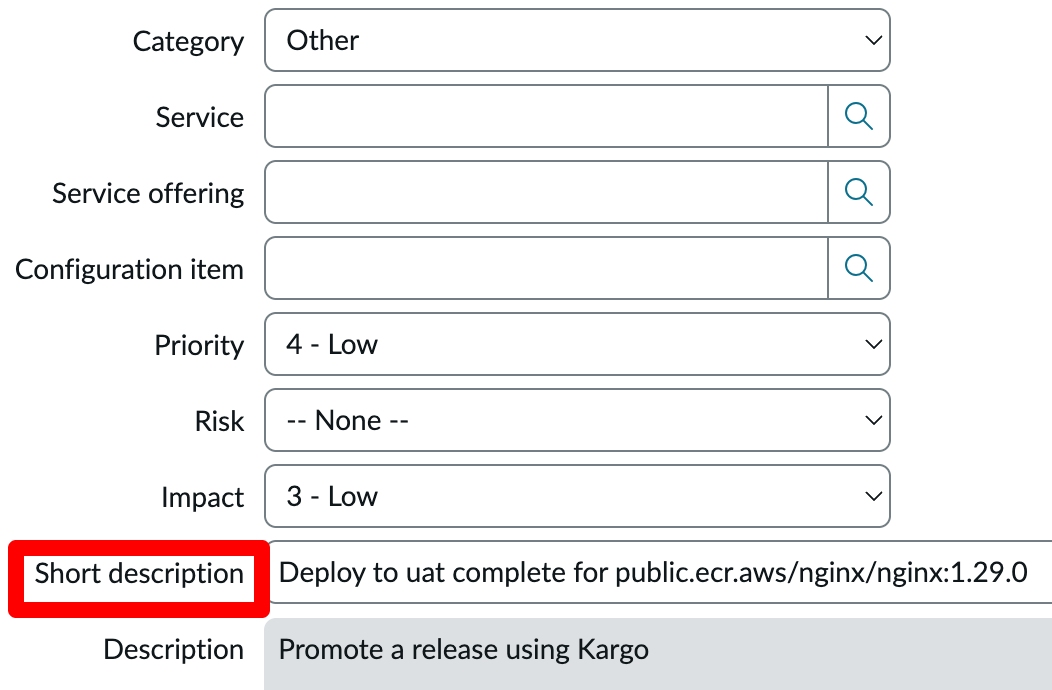
You can't use Short description in the REST API. You need to use short_description as the key and set the value via REST API parameters.
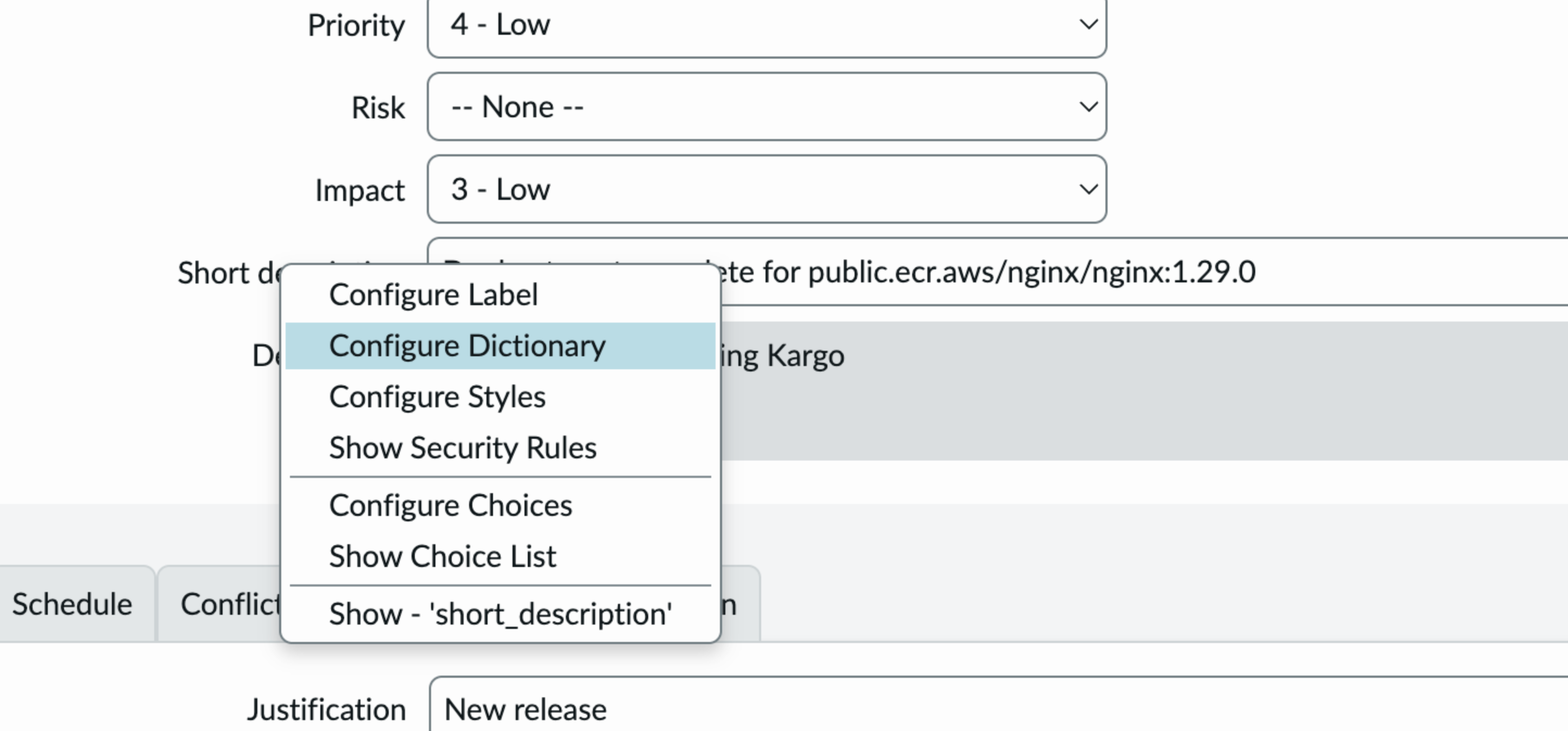
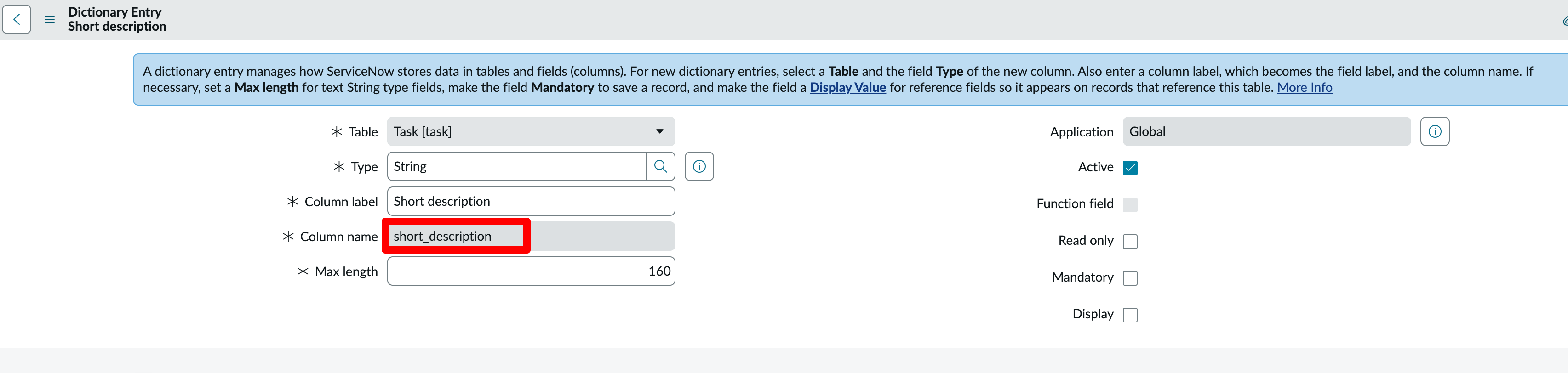
To find the correct key for a field, right-click on the field and click Configure Dictionary:
column_name is the key:
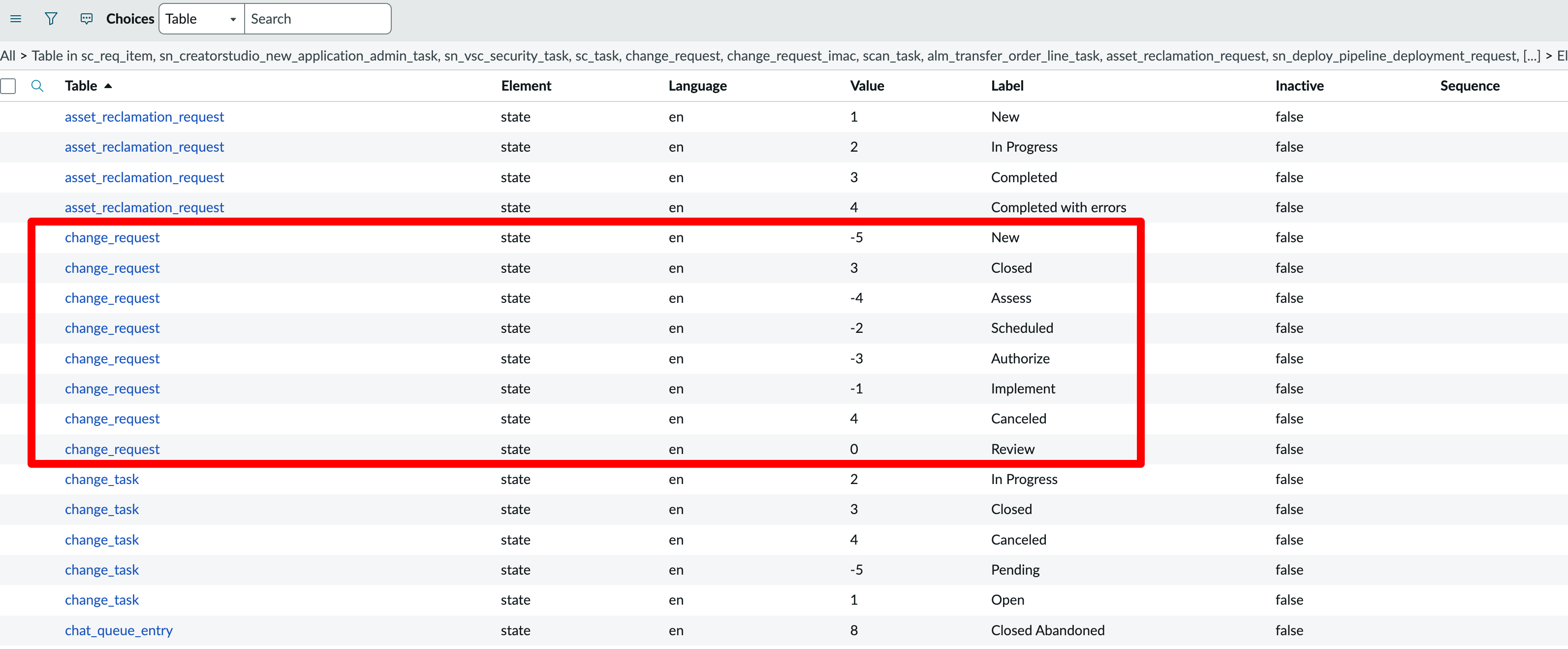
To see choices available for a particular field e.g., State, right click on the field and click on Show Choice List to see the available choices for use in the steps:
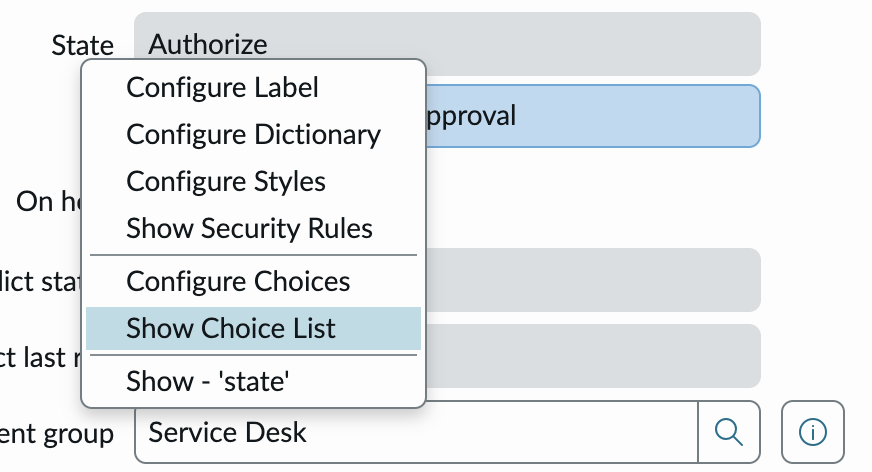
For example New is -1 and Scheduled is -2
Configuration
Credentials
All ServiceNow operations require proper authentication credentials stored in a Kubernetes
Secret.
| Name | Type | Required | Description |
|---|---|---|---|
credentials.secretName | string | Y | Name of the Secret containing the ServiceNow credentials in the project namespace. |
credentials.type | string | Y | Type of ServiceNow credentials to use for authentication (either api-token or basic). |
For credentials.type: api-token the referenced Secret should contain the following keys:
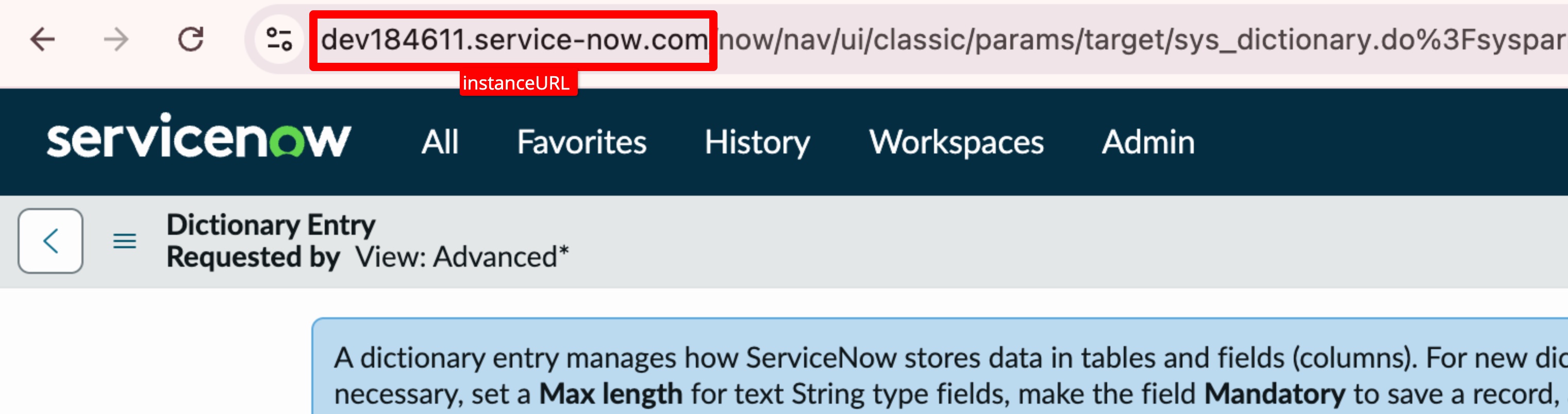
apiToken: ServiceNow API Token (see this blog post for how to create an API token in ServiceNow).instanceURL: Your ServiceNow instance URL.
For credentials.type: basic the referenced Secret should contain the following keys:
username: Username of the ServiceNow user (you may want to create a user specifically for this integration).password: Password of the ServiceNow user (for how to set the password for a user, see this).instanceURL: Your ServiceNow instance URL.
Record
| Name | Type | Required | Description |
|---|---|---|---|
parameters | string map | Y | Parameters/fields of the record. |
tableName | string | Y | Table name of the record type you want to create (e.g., incident, problem, change_request). |
template | object | N | Specify this and the subfields below to create a Change Request using the Change Management API (if omitted, the Table API is used). |
template.type | string | Y/N | Template type (standard, emergency, or normal). Required if template is specified; otherwise optional. |
template.templateId | string | Y/N | Template ID of the standard template (required if template.type is standard; otherwise optional). |
Output
| Name | Type | Description |
|---|---|---|
sys_id | string | The sys_id of the created ServiceNow record (e.g., ed89b72c83c172104517e470ceaad30a). |
number | string | The number of the created ServiceNow record (e.g., CH-123). |
Example
This example creates a new Change Request using the Change Management API:
steps:
  - as: snowcreate
    config:
      credentials:
        secretName: snow-creds
        type: api-token
      parameters:
        impact: "3"
        short_description: Deploy to ${{ ctx.stage }} complete for ${{ vars.imageRepo
          }}:${{ imageFrom(vars.imageRepo).Tag }}
        urgency: "3"
      tableName: change_request
      template:
        templateId: ed89b72c83c172104517e470ceaad30a # example
        type: standard
    uses: snow-create
# Use the created snow record number in subsequent steps
  - as: snowquery
    config:
      credentials:
        namespace: kargo-demo
        secretName: snow-creds
        type: api-token
      query:
        number: ${{ task.outputs.snowcreate.number }}
      tableName: change_request
    uses: snow-query-records
This example creates a new Incident using the Table API:
steps:
  - as: snowcreate
    config:
      credentials:
        secretName: snow-creds
        type: api-token
      parameters:
        impact: "3"
        short_description: Deploy to ${{ ctx.stage }} complete for ${{ vars.imageRepo }}:${{ imageFrom(vars.imageRepo).Tag }}
        urgency: "3"
      tableName: incident
    uses: snow-create
# Use the created snow record number in subsequent steps
  - as: snowquery
    config:
      credentials:
        namespace: kargo-demo
        secretName: snow-creds
        type: api-token
      query:
        number: ${{ task.outputs.snowcreate.number }}
      tableName: incident
    uses: snow-query-records
This example creates a new Change Request using the Table API (notice how the template field is omitted):
steps:
  - as: snowcreate
    config:
      credentials:
        secretName: snow-creds
        type: api-token
      parameters:
        impact: "3"
        short_description: Deploy to ${{ ctx.stage }} complete for ${{ vars.imageRepo
          }}:${{ imageFrom(vars.imageRepo).Tag }}
        urgency: "3"
      tableName: change_request
    uses: snow-create
# Use the created snow record number in subsequent steps
  - as: snowquery
    config:
      credentials:
        namespace: kargo-demo
        secretName: snow-creds
        type: api-token
      query:
        number: ${{ task.outputs.snowcreate.number }}
      tableName: change_request
    uses: snow-query-records
Different E2E Workflows
These examples demonstrate the different steps supported for ServiceNow integration.
Change API Workflow
  - as: snowcreate
    config:
      credentials:
        secretName: snow-creds
        type: api-token
      parameters:
        impact: "3"
        short_description: Deploy to ${{ ctx.stage }} complete for ${{ vars.imageRepo
          }}:${{ imageFrom(vars.imageRepo).Tag }}
        urgency: "3"
      tableName: change_request
      template:
        templateId: ed89b72c83c172104517e470ceaad30a
        type: standard
    uses: snow-create
  - as: snowquery
    config:
      credentials:
        namespace: kargo-demo
        secretName: snow-creds
        type: api-token
      query:
        number: ${{ task.outputs.snowcreate.number }}
      tableName: change_request
    uses: snow-query-records
  - as: snowupdate
    config:
      credentials:
        secretName: snow-creds
        type: api-token
      parameters:
        short_description: Update deployment for ${{ vars.imageRepo }}:${{
          imageFrom(vars.imageRepo).Tag }} to resolved
      tableName: change_request
      template:
        type: standard
      ticketId: ${{ task.outputs.snowquery.sys_id }}
    uses: snow-update
  - as: snow-wait-for-condition
    config:
      condition: state=-2
      credentials:
        namespace: kargo-demo
        secretName: snow-creds
        type: api-token
      tableName: change_request
      ticketId: ${{ task.outputs.snowquery.sys_id }}
    uses: snow-wait-for-condition
  - as: snowdelete
    config:
      credentials:
        secretName: snow-creds
        type: api-token
      tableName: change_request
      template:
        type: standard
      ticketId: ${{ task.outputs.snowquery.sys_id }}
    uses: snow-delete
Table API Workflow
  - as: snowcreate
    config:
      credentials:
        secretName: snow-creds
        type: api-token
      parameters:
        impact: "3"
        short_description: Deploy to ${{ ctx.stage }} complete for ${{ vars.imageRepo }}:${{ imageFrom(vars.imageRepo).Tag }}
        urgency: "3"
      tableName: incident
    uses: snow-create
  - as: snowquery
    config:
      credentials:
        namespace: kargo-demo
        secretName: snow-creds
        type: api-token
      query:
        number: ${{ task.outputs.snowcreate.number }}
      tableName: incident
    uses: snow-query-records
  - config:
      ticketId: ${{ task.outputs.snowquery.sys_id }}
      credentials:
        secretName: snow-creds
        type: api-token
      parameters:
        short_description: Update deployment for ${{ vars.imageRepo }}:${{ imageFrom(vars.imageRepo).Tag }} to resolved
      tableName: incident
    uses: snow-update
  - as: snow-wait-for-condition
    config:
      condition: state=6
      credentials:
        namespace: kargo-demo
        secretName: snow-creds
        type: api-token
      tableName: incident
      ticketId: ${{ task.outputs.snowquery.sys_id }}
    uses: snow-wait-for-condition
  - as: snowdelete
    config:
      credentials:
        secretName: snow-creds
        type: api-token
      tableName: incident
      ticketId: ${{ task.outputs.snowquery.sys_id }}
    uses: snow-delete
Here's a Table API workflow with Change Request:
  - as: snowcreate
    config:
      credentials:
        secretName: snow-creds
        type: api-token
      parameters:
        impact: "3"
        short_description: Deploy to ${{ ctx.stage }} complete for ${{ vars.imageRepo
          }}:${{ imageFrom(vars.imageRepo).Tag }}
        urgency: "3"
      tableName: change_request
    uses: snow-create
  - as: snowquery
    config:
      credentials:
        namespace: kargo-demo
        secretName: snow-creds
        type: api-token
      query:
        number: ${{ task.outputs.snowcreate.number }}
      tableName: change_request
    uses: snow-query-records
  - as: snowupdate
    config:
      credentials:
        secretName: snow-creds
        type: api-token
      parameters:
        short_description: Update deployment incident for ${{ vars.imageRepo }}:${{
          imageFrom(vars.imageRepo).Tag }} to resolved
      tableName: change_request
      ticketId: ${{ task.outputs.snowquery.sys_id }}
    uses: snow-update
  - as: snow-wait-for-condition
    config:
      condition: state=-2
      credentials:
        namespace: kargo-demo
        secretName: snow-creds
        type: api-token
      tableName: change_request
      ticketId: ${{ task.outputs.snowquery.sys_id }}
    uses: snow-wait-for-condition
  - as: snowdelete
    config:
      credentials:
        secretName: snow-creds
        type: api-token
      tableName: change_request
      ticketId: ${{ task.outputs.snowquery.sys_id }}
    uses: snow-delete